Run on the workstation.
Codex runs in a host-owned session on the cloud machine. Your browser connection isn’t the process keeping it alive.
 gBlockParty
A CLOUD WORKSTATION FOR AI CODING AGENTS
Give your coding agents a place to run beyond your laptop. Keep sessions on a cloud host, and see what needs you in one Agent Board.
Codex-first · Private alpha · Onboarding by conversation
01 / A PLACE FOR THE WORK
For solo developers and technical founders already running coding agents. Especially when another terminal tab is becoming another thing to babysit.
Codex runs in a host-owned session on the cloud machine. Your browser connection isn’t the process keeping it alive.
See session status and recent output together. Open the session that needs attention for a closer look at its terminal.
Detach without stopping the session. Reattach while the host and process remain healthy. History recovery and physical device handoff are still being qualified.
02 / THE AGENT BOARD
A monitoring and control surface for your workstation, with a session’s status, repository, and output in the same view.
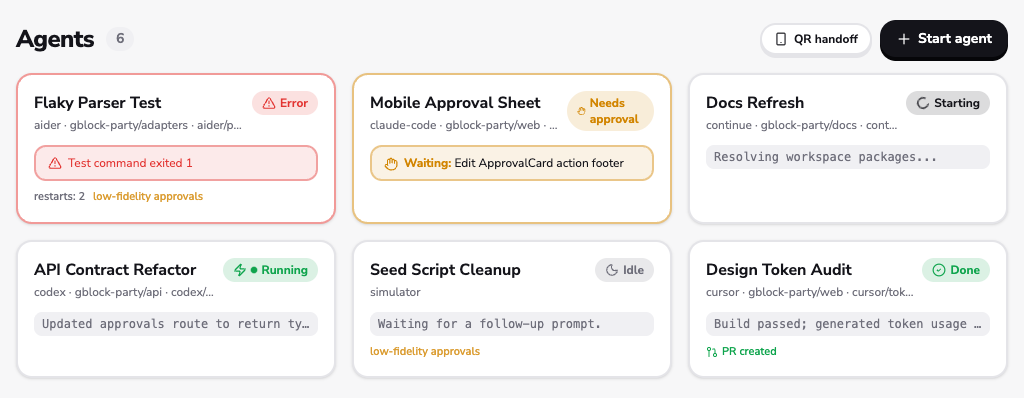
Running, waiting, and failed sessions have distinct states. Approval behavior depends on the agent adapter; the Codex-first path uses sandboxed writes and post-task diff review.
The browser is a way into the workstation. The external-client protocol supports revocable devices, read-only observers, and one leased terminal writer at a time.
03 / WHY A WORKSTATION?
A VPS and tmux can already keep a process running. The missing piece is a clear view of the work—and a deliberate way back into it.
gBlockParty brings session lifecycle, board visibility, terminal attachment, and access controls into one system. The first cloud path is Codex; broader agent and client choice is being developed, not promised as universal compatibility.
04 / BUILT. STILL BEING QUALIFIED.
The MVP is implemented. We’re proving the operational details before offering self-serve access.
What to know before joiningHost-owned sessions, browser monitoring and terminal attachment, scoped external clients, and input leases.
A supervised alpha run passed, including a planned service restart. This is a bounded test, not an uptime guarantee.
A later prompt-handling incident broke session/history continuity. The safety correction is deployed; durable-history acceptance and the physical Mac → phone → Mac run remain open.
05 / BEFORE YOU JOIN
Solo developers and technical founders who already use coding agents, understand remote development, and want to help test persistent sessions and monitoring. The current alpha is a private, single-operator environment, not a shared team service.
Codex CLI is the implemented cloud-host path. The codebase also includes Claude Code, Claude Agent SDK, and basic CLI adapters, but they are not qualified cloud offerings. A VS Code extension is implemented; physical Windows acceptance is pending. Chromux has partial attach-only integration. T3 Code, Cursor, and arbitrary bring-your-own clients are not promised integrations.
There is no instant provisioning flow today. Alpha setup is operator-assisted: a cloud host, agent installation and authentication, private network access, and client configuration. We’ll discuss your workflow and readiness before arranging access; no setup-time promise.
The current alpha runs on a dedicated OVH VPS behind a private Tailscale network. The workstation is not exposed on this public website. External-client enrollment uses revocable scoped credentials, with one input lease and concurrent read-only observers. Production multi-user authentication, team permissions, and enterprise compliance are not available.
Disconnecting a client does not stop a host-owned agent. It does not mean an agent can run through every failure or work past its own limits. Same-host terminal history is implemented with default retention of seven days, 32 MiB per agent, and 1 GiB per host. Acceptance remains open after a preservation incident. Host loss, machine replacement, and cross-host recovery are not proven.
The responsive browser interface includes an away-from-desk Stream view. Phone enrollment, backgrounding, reconnect behavior, and the complete physical Mac → phone → Mac session handoff still need acceptance. We are not advertising proven anywhere-on-any-device control.
Public pricing and commercial plans are not set. Agent accounts or model usage and cloud infrastructure are separate cost considerations; no bundled allowance is promised. Capacity depends on the host and workload. Early-access discussions will cover costs and operating limits before any commitment.
LET’S TALK ABOUT YOUR WORKSTATION
Tell us which agent you use, what you run, and where your current setup gets in the way. Start an early-access conversation with the founder.
Email about early accessOpens your email app. You can also write to george@leexperimental.com. Private alpha; access is arranged individually.